


OBD2 Car Scanner: Torque ELM
4.170.00 Reviews
App Specs
- Version
- 3.9
- Updated On
- License
- Free
- Downloads
- 500,000+
- Developer
- MONIQ TAP., CO LTD
- Categories
- Auto & Vehicles
- Platform
- Android
Screenshots
 Analysis by AppCompare
I usually notice OBD2 apps when a warning light appears and I want a clearer idea of what to ask a mechanic. OBD2 Car Scanner: Torque ELM is aimed at that practical moment as well as at drivers who enjoy watching vehicle data. It turns a compatible Bluetooth adapter and a phone into a way to inspect diagnostic information, rather than a magic fix for whatever is happening under the bonnet. I find that distinction important: it can make a problem easier to discuss, but it cannot confirm every cause or replace a proper inspection.
This is a free Auto & Vehicles app from MONIQ TAP., CO LTD, with optional in-app purchases. It has an average rating of 3.9 from around 11,000 ratings and has been installed over 500,000 times, so it has found a sizeable audience without being an automatic fit for every car or driver. It is rated for Everyone, runs on Android 8.0 or later, and version 3.2 is the current release. The useful question is less whether it has a long feature list and more whether your car, adapter and expectations line up.
Getting Started with Torque ELM
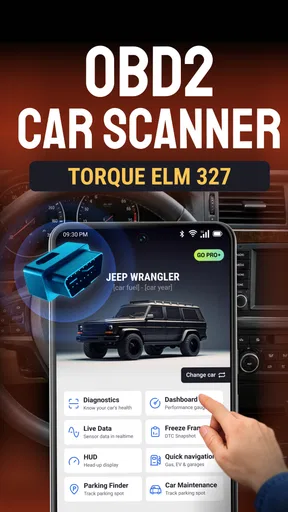
First things first, setting up the OBD2 Car Scanner: Torque ELM app was a breeze. All you need is an OBD2 Bluetooth adapter, and you’re good to go. Once you’ve plugged the adapter into your car's OBD2 port (usually located under the dashboard), you just pair it with your phone’s Bluetooth. The app connects seamlessly, and you’re ready to start diagnosing.
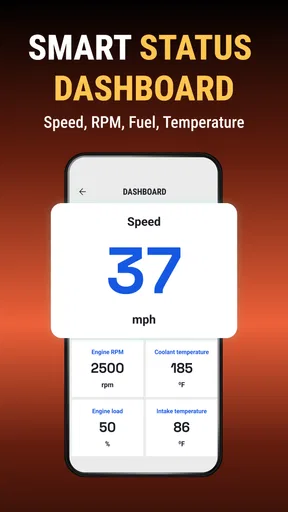
The interface is pretty user-friendly. Even if you’re not a tech whiz, navigating through the menus feels intuitive. The dashboard is customizable, which means you can set it up to show the data you care about the most. Want to keep an eye on your car's RPMs or fuel consumption? Just drag and drop the widgets where you want them.
Before You Blame the Connection
In everyday use, “it won’t connect” can mean several different things: the adapter may not be seated firmly, the phone may not have paired with it, or the car may not be in a state where the scanner can communicate. I’d check the simple pieces in that order before reinstalling anything. Make sure the adapter is pushed fully into the diagnostic socket, confirm Bluetooth pairing on the phone, and follow the adapter’s own instructions for whether the ignition should be on or the engine running. The exact behavior can vary by vehicle and adapter.
If you’re buying an adapter specifically for this app, I’d avoid assuming that every device advertised as an OBD2 Bluetooth scanner will behave identically. The app relies on that separate hardware to communicate with the car, so a weak or incompatible adapter can look like an app problem. Check that the adapter supports your phone and vehicle, and keep in mind that a low-cost unit may be less reliable than a well-made one. I’d also unplug it when you’re finished if you don’t need it left in the port.
A More Useful First Session
Rather than filling the dashboard with every available reading, I’d start with just a few items relevant to the question at hand. A simpler screen is easier to interpret and less distracting, especially if you’re checking live data while parked with the engine on. For a warning light, begin with the diagnostic code and note it down before doing anything else. If you want to watch a sensor, choose that reading first and see whether its changes make sense in the context of the car’s state.
Worth Reading Before You Choose

Flipboard Shows What News Apps Must Do Beyond the Feed

Switching to Android Auto Means Rethinking Your Driving Routine

Google Calendar Makes a Crowded Week Easier to Manage

Ludo King Makes the Most of the Minutes Between Plans

Baby Panda World Brings Quick Play to Modern Phones, but Its Game Library Feels Busy

ESPN’s Live Game View Makes Following Close Games Easier
Readiness tests are useful for a different reason: they can show whether the vehicle’s onboard checks have completed. That can help you understand why a car may not yet be ready for an emissions inspection after a repair or battery interruption. It is not a repair checklist, though, and a readiness result by itself does not establish that the vehicle is safe or that an underlying fault has been fixed. I treat it as one piece of information to share with a technician, not as a pass-or-fail verdict on the whole car.
Diving into the Features
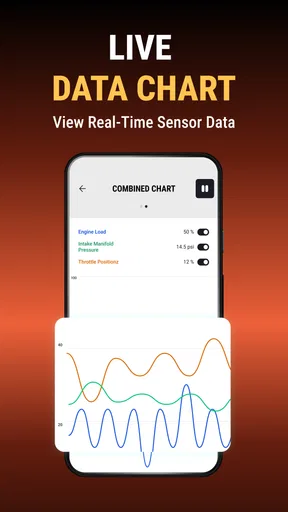
What really sets this app apart are the features. You can read real-time data from your car’s sensors, which is super useful. The app displays everything from speed and torque to coolant temperature and fuel economy. It’s like having a mini diagnostics lab in your pocket.
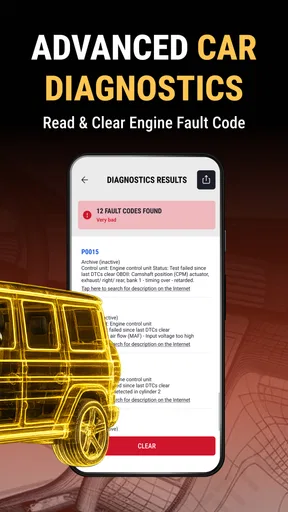
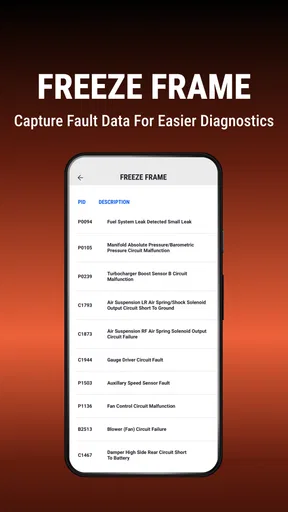
One of the standout features is the ability to read fault codes. If that pesky check engine light comes on, you can whip out your phone and see exactly what’s going on. No more guesswork or unnecessary trips to the mechanic. Plus, the app provides detailed explanations of the codes, so you’re not left scratching your head.
“The fault code feature has saved me from a few panic attacks. Knowing what’s wrong with my car before I hit the garage is a total game-changer.”
What a Code Can—and Cannot—Tell You
A code is a clue about a system the car has detected, not a complete diagnosis of the failed part. Several issues can trigger similar codes, and the explanation on a phone screen can’t account for every detail a mechanic would check. My practical approach is to record the code, note when the warning appeared and whether the car’s behavior changed, then share those details with a repair shop. That makes the scan valuable without encouraging a guess-and-replace approach.
Clearing a code deserves particular care. If you erase it immediately, you may lose useful evidence about an intermittent issue, and the warning can return if the cause remains. I would read and save the code first, then clear it only when there is a clear reason to do so, such as after a repair or as part of a deliberate check. If a warning comes with serious symptoms, such as unusual noises or a major change in how the car runs, a phone scan is not a reason to keep driving.
Performance and Usability
In terms of performance, the app is pretty solid. Data updates are quick, and I didn’t experience any lag. It’s worth mentioning that the speed and accuracy of the readings can depend on the quality of your OBD2 adapter, so investing in a good one is key.
Usability-wise, the app offers a clean design. The graphs and live data are easy to read, even if you’re driving. However, I’d recommend setting everything up while parked to avoid distractions. Safety first, right?
Making Live Data Worth Checking
Live readings are most helpful when you have a specific question, not when you watch numbers simply because they move. For example, if you’re trying to understand whether a temperature reading changes as the car warms up, compare it under consistent conditions while parked. A single snapshot may be misleading, and different vehicles expose different data. If a value is missing or seems implausible, I’d first consider whether the car provides that reading and whether the adapter is communicating properly, rather than treating the number as proof of a fault.
There’s also a trade-off between a busy dashboard and a useful one. I’d arrange only the readings I can explain and check them before setting off; glancing at a crowded display on the road adds distraction without necessarily adding insight. For a driver who wants a quick warning-code check every few months, the live-data side may be more than needed. For someone who likes comparing sensor behavior over time, it can make the app feel more worthwhile.
When the App Isn’t the Problem
If the app opens but cannot show the result you expect, the vehicle itself may be the limiting factor. OBD2 access is useful for many common diagnostics, but it does not mean a phone can inspect every system or reveal every manufacturer-specific detail. A basic code reader may be enough for a check-engine question; a garage’s diagnostic equipment may be the better choice for a complex fault, a system outside the scanner’s reach, or a problem that needs physical testing.
It’s also worth separating a warning light from the symptoms you feel. A code can help you describe the situation, but it cannot judge whether a car is safe to drive or whether a repair is urgent. If the vehicle is behaving unusually, use your judgment and get qualified help rather than relying on a reassuring-looking screen. I see this app as a useful information-gathering tool, not a substitute for roadside assistance, maintenance advice or a mechanic’s inspection.
Enhancing Your Driving Experience
Besides diagnostics, the app has some cool features for enhancing your driving experience. You can track your trips, which is great for those who love analyzing their driving habits. There’s even a feature that helps you improve fuel efficiency. If you’re into eco-friendly driving, this might be right up your alley.
Another fun feature is the GPS tracking with route recording. For those long road trips, it’s nice to have a record of where you’ve been and how your car performed along the way. And if you’re competitive, you can share your stats with friends and see who’s the better driver.
Where Trip Tracking Fits
Trip records make more sense when you have a reason to compare journeys. I’d use them to look at the same commute over time or to review a long drive after arriving, rather than trying to study the phone while moving. A repeat route gives you a more meaningful comparison than two trips with different traffic, weather or driving conditions. Fuel economy readings can also be affected by how the car estimates them, so I treat changes as a prompt to look closer, not as a precise measure of savings.
For someone who already uses a dedicated navigation app or a vehicle’s built-in trip computer, route recording may feel redundant. The appeal here is having driving information and scan-related tools in one place, but it does not automatically make it a better navigation choice. I’d choose it for curiosity about the car’s data and use a familiar navigation option for directions if that is the main task.
Who Will Get the Most from It
I think the strongest match is a driver who already owns a compatible adapter, wants to understand a warning before calling a garage, or enjoys learning how the car behaves through sensor readings. It can also suit a careful DIY owner who records codes and symptoms after a repair, while still knowing when a job needs professional diagnosis. The free download makes it easy to explore the basic idea, though optional purchases range from $4.99 to $59.99 per item, so I’d check what is included before paying for anything.
I’d skip it if you expect the app alone to identify a broken component, if you need advanced manufacturer-level diagnostics, or if you have no interest in buying and pairing separate hardware. It may also be unnecessary for a driver who only wants routine maintenance reminders or turn-by-turn navigation; those needs are better served by tools focused on those jobs. Compared with a simple handheld code reader, this app can offer a more flexible phone dashboard and trip-oriented use, but the reader may be more straightforward when all you want is a quick scan without managing a phone connection.
Final Thoughts
All in all, the OBD2 Car Scanner: Torque ELM app is a must-have for anyone who wants to keep tabs on their car’s health. Whether you’re a car enthusiast or just someone who likes to be prepared, this app offers a wealth of information right at your fingertips.
While the app does a fantastic job, remember that it’s not a replacement for a professional mechanic. It’s a tool to give you insights and help you make informed decisions. So, if you’re curious about your car’s inner workings or just want to be a more informed driver, give this app a try. You might just find yourself geeking out over car diagnostics in no time!
A Real-World Way to Use It
Imagine the check-engine light comes on during an ordinary week, but the car still seems to drive normally. Once safely parked, I’d connect the adapter, read the code, save it, and write down when the light appeared and what I noticed. I’d avoid clearing anything before that note is made. With the code and symptoms in hand, I could call a mechanic with a more focused description instead of trying to diagnose the repair myself. If the car feels unsafe or the warning is accompanied by serious symptoms, I would stop treating the scan as the next step and seek help.
That small routine is where the app seems most useful to me: it can reduce uncertainty and make a conversation about a fault more informed. It is less compelling if you expect a phone to replace a diagnostic workshop, or if connection troubleshooting would outweigh the occasional insight you want. Keep the dashboard simple, use readings with a clear question in mind, and treat codes as evidence rather than answers. With those expectations, this is a practical companion for curious, cautious drivers—not a promise that every car problem can be solved from the driver’s seat.
Pros
- Easy to use interface for beginners.
- Supports a wide range of car models.
- Real-time data monitoring available.
- Customizable dashboard options.
- Affordable compared to competitors.
Cons
- May require additional hardware.
- Limited functionality on some cars.
- Occasional connectivity issues.
- No support for iOS devices.
- User interface feels outdated.
FAQs for OBD2 Car Scanner: Torque ELM
What is the primary function of the OBD2 Car Scanner: Torque ELM app?
The OBD2 Car Scanner: Torque ELM app is designed to diagnose vehicle issues by connecting with an OBD2 adapter. It provides real-time data, reads trouble codes, and offers insights into your car's performance. It's a valuable tool for car enthusiasts and professionals aiming to understand and solve vehicle issues efficiently.
Is the OBD2 Car Scanner: Torque ELM app compatible with all vehicles?
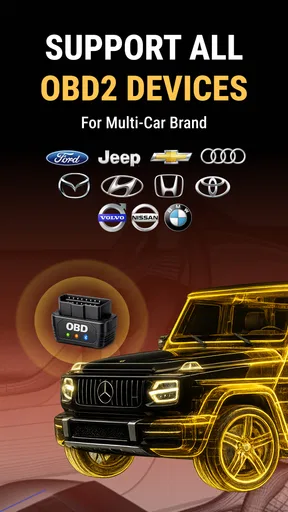
The app works with most vehicles manufactured after 1996, as these are equipped with OBD2 ports. However, compatibility can vary based on the car's make and model. It's recommended to check the app's compatibility list or consult with the manufacturer to ensure it will work with your specific vehicle.
Do I need any additional hardware to use the OBD2 Car Scanner: Torque ELM app?
Yes, you will need an OBD2 adapter (such as ELM327) to connect your smartphone to your vehicle's OBD2 port. This adapter facilitates the communication between the app and your car's onboard diagnostic system, enabling the app to read and interpret diagnostic data.
What types of data can I expect to see using the OBD2 Car Scanner: Torque ELM app?
The app allows you to monitor various data points such as engine RPM, fuel system status, speed, coolant temperature, and more. It also enables you to read diagnostic trouble codes (DTCs), which help identify specific issues within the vehicle, making it easier to address maintenance and repair needs.
How user-friendly is the OBD2 Car Scanner: Torque ELM app for beginners?
The app is designed with a user-friendly interface, making it accessible for both beginners and experienced users. It offers clear instructions and an intuitive layout. However, understanding some technical terms might require a bit of learning for complete novices, but overall, the app is designed to be navigable and easy to use.


